체육관 관리 앱, 핀 관리자
핀 관리자는 ABoardFit 앱 안에서 쓰는 체육관 관리 도구예요. 크로스핏 박스와 체육관, 개인 운영자가 수업 시간표와 예약, 회원권과 홀딩, 출석 체크, 한 달 WOD, 회원 기록 인증을 휴대폰 하나로 관리할 수 있어요. 회원도 같은 앱으로 예약하고 출석해요.
앱을 설치한 뒤 코인 상점 → 프리미엄 → 핀 관리자에서 구독을 시작해요.
핀 관리자로 할 수 있는 일
수업 시간표·예약
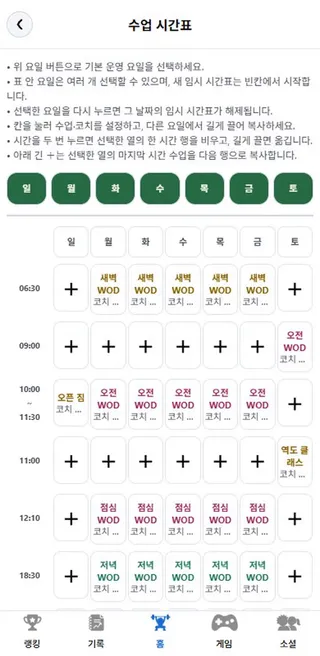
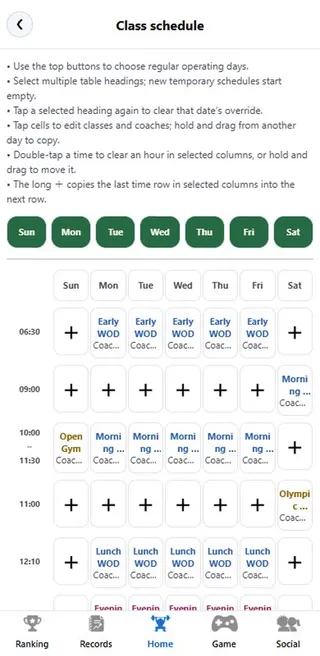
요일별 시간표를 짜면 회원이 앱에서 바로 예약해요.
- 요일·시간 칸을 눌러 수업과 코치 지정
- 정원, 예약 가능 일수, 취소 마감 시간 설정
- 수업마다 예약할 수 있는 회원권 지정
- 날짜별 임시 시간표로 휴일·특강 대응
- 수업별 예약 현황을 보고 출석 처리
회원·회원권 관리
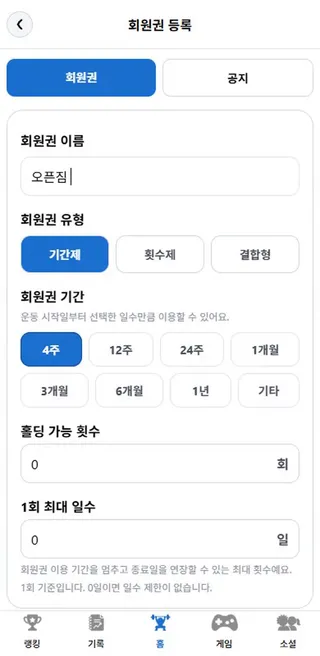
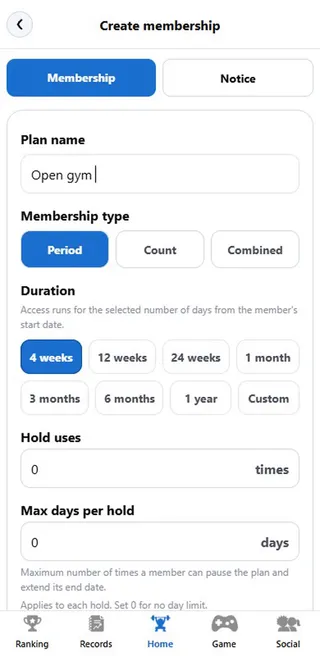
기간제, 횟수제, 결합형 회원권을 직접 만들어요.
- 4주·12주·1개월·1년 등 기간 선택, 횟수제는 출석할 때마다 1회 차감
- 홀딩 가능 횟수와 1회 최대 일수 설정
- 회원의 소속·홀딩·연장 신청 승인
- 회원별 남은 기간과 횟수를 한눈에
- 회원 공지
WOD NEXT · 출석 포인트
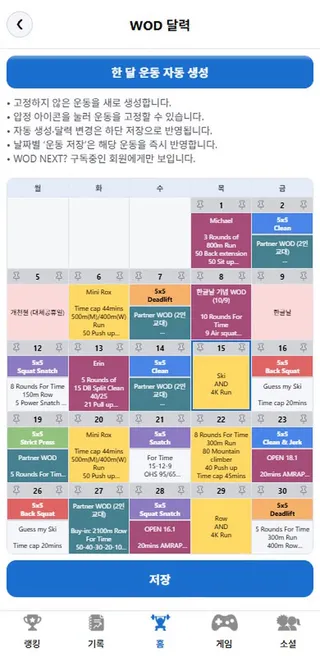
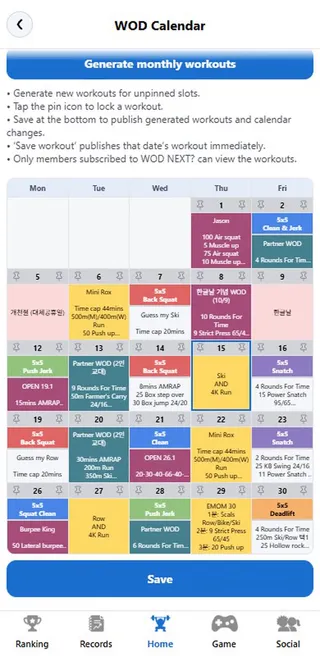
한 달 운동을 자동으로 짜서 회원 홈에 띄워요.
- '한 달 운동 자동 생성', 원하는 날은 고정
- 저장하면 WOD NEXT 구독 회원 홈에 오늘·다음 운동 표시
- 체육관 근처(약 150m)에서 위치로 출석 체크, 출석하면 포인트 적립
기록 인증 · 랭킹
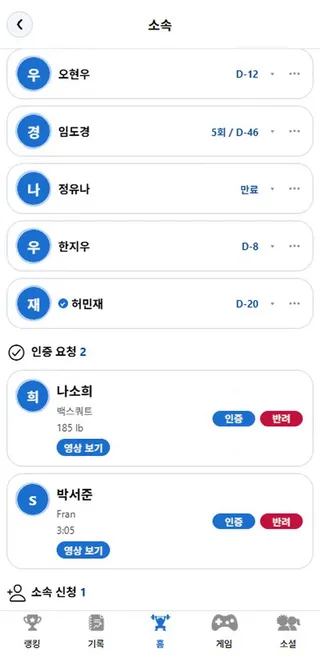
회원이 올린 영상을 보고 기록을 인증해요.
- 회원은 기록에 YouTube 영상 링크 첨부
- 운영자가 영상을 확인하고 인증 또는 반려
- 인증된 기록만 주변·전국·세계 랭킹에 반영
- 회원 기록 조회
시작하는 방법
- App Store 또는 Google Play에서 ABoardFit을 설치하고 가입해요.
- 코인 상점 → 프리미엄 탭에서 핀 관리자를 구독해요.
- 소셜 → 주변 탭에서 내 체육관 핀을 등록해요. 구독 중에는 핀 1개를 무료로 유지해요.
- 핀 관리에서 회원권과 수업 시간표를 만들고, 회원의 소속 신청을 수락하면 준비 끝.
요금
핀 관리자는 월 9,900원의 자동 갱신 구독이에요(한국 스토어 기준, 다른 나라는 각 스토어 현지 가격). 앱의 코인 상점 → 프리미엄 탭에서 구독하고, 다음 결제일 전에 App Store 또는 Google Play 구독 설정에서 언제든 해지할 수 있고, 해지해도 이미 결제한 기간이 끝날 때까지 이용할 수 있어요.
- 핀 1개 무료 등록, 구독 중 유지, 무제한 수정
- 관리자 뱃지, 배너·프로필 수정
- 등록 체육관 회원 직접 승인, 회원 기록 조회
자주 묻는 질문
크로스핏 박스가 아니어도 쓸 수 있나요?
네. 핀 관리자는 체육관과 개인 운영자용이에요. 크로스핏 박스가 아니어도 수업 예약, 회원권, 출석 관리가 필요한 곳이면 쓸 수 있어요.
회원도 돈을 내야 하나요?
ABoardFit 앱은 무료로 내려받을 수 있어요. 회원은 앱에서 내 체육관에 소속 신청을 하고, 수락되면 수업 예약, 출석, 홀딩 신청을 할 수 있어요. WOD 달력을 회원 홈에서 보여 주는 WOD NEXT는 회원이 고르는 별도 구독이에요.
구독은 어떻게 해지하나요?
iPhone은 [설정] > 본인 이름(Apple ID) > [구독], Android는 Google Play 스토어 앱 > 프로필 > [결제 및 정기 결제] > [정기 결제]에서 해지해요. 다음 결제일 전에 해지하면 갱신이 멈추고, 이미 결제한 기간이 끝날 때까지 이용할 수 있어요.
회원 기록 인증은 어떻게 하나요?
회원이 기록을 올리면 '대기' 상태가 되고, 운영자가 핀 관리에서 영상을 확인해 인증하면 랭킹에 반영돼요. 회원이 코인으로 자기 기록을 인증할 수는 없어요.
문의는 어디로 하나요?
aboardfit@naver.com으로 보내 주세요. 영업일 기준 2~3일 안에 답변해요. 결제·환불·계정 안내는 지원 페이지에 있어요.
Gym management app: Pin Manager
Pin Manager is the gym management toolkit inside the ABoardFit app. CrossFit boxes, gyms and independent operators run the class schedule and booking, memberships and holds, check-ins, a month of WODs and member record verification from one phone. Members book and check in with the same app.
After installing, start your subscription in Coin Shop → Premium → Pin Manager.
What you can manage
Class schedule & booking
Build the weekly timetable and members book in the app right away.
- Tap a day and time slot to set the class and coach
- Set capacity, booking window and cancellation cutoff
- Choose which memberships can book each class
- Date overrides for holidays and specials
- See bookings per class and mark attendance
Members & memberships
Create period, count-based and combined memberships.
- Pick 4 weeks, 12 weeks, 1 month, 1 year and more; count plans deduct one visit per check-in
- Set hold count and max days per hold
- Approve join, hold and extension requests
- Remaining days and visits per member at a glance
- Member notices
WOD NEXT & attendance points
Auto-plan a month of workouts onto members' home screen.
- Generate monthly workouts and pin the days you like
- Save to show today's and the next workout to WOD NEXT subscribers
- Location check-in near the gym (about 150 m) earns attendance points
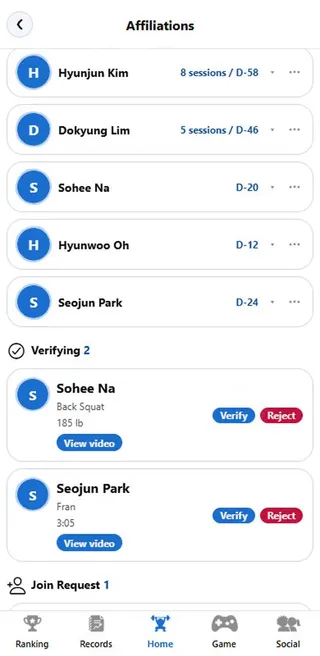
Record verification & rankings
Watch members' videos and verify their records.
- Members attach a YouTube link to a record
- You review the video, then verify or reject
- Only verified records count on local, national and world leaderboards
- View member records
How to get started
- Install ABoardFit from the App Store or Google Play and sign up.
- Subscribe to Pin Manager in Coin Shop → Premium.
- Register your gym's pin in Social → Nearby. One pin stays free while you are subscribed.
- Create memberships and the class schedule in Pin management, accept members' join requests, and you are set.
Pricing
Pin Manager is an auto-renewing subscription at ₩9,900 per month in Korea (other countries use local store pricing). Subscribe in the app under Coin Shop → Premium. Cancel anytime before the next billing date in your App Store or Google Play subscription settings; you keep access until the paid period ends.
- One free pin while subscribed, with unlimited edits
- Manager badge, banner and profile editing
- Approve your gym's members directly and view member records
Frequently Asked Questions
Can I use it if I don't run a CrossFit box?
Yes. Pin Manager is for gyms and independent operators. Any place that needs class booking, memberships and check-ins can use it.
Do members have to pay?
ABoardFit is free to download. Members send a join request to your gym in the app, and once accepted they can book classes, check in and request holds. WOD NEXT, which shows your WOD calendar on members' home screen, is a separate optional subscription for members.
How do I cancel the subscription?
iPhone: Settings > your name (Apple ID) > Subscriptions. Android: Google Play Store app > profile > Payments & subscriptions > Subscriptions. Canceling before the next billing date stops renewal, and you keep access until the paid period ends.
How does record verification work?
A member's record starts as pending. After you watch the video in Pin management and verify it, it counts toward the rankings. Members cannot verify their own records with coins.
How do I contact you?
Email aboardfit@naver.com. We reply within 2–3 business days. Payments, refunds and account help are on the support page.